Lesson 1: What Is Embedded Linux?
Óbuda University — Linux in Embedded Systems
This Course
12 weeks. Theory + lab every week. No final exam — the project is the exam.
| Weeks | What you learn | What you build |
|---|---|---|
| 1-3 | OS, Linux fundamentals, sensor + driver path | SSH in, explore Linux, MCP9808 + OLED |
| 4-5 | Reliability, IoT, then graphics stack | Data logger, secure setup, HDMI display apps |
| 6-9 | Boot flow, device tree, drivers, Buildroot | Kernel drivers, custom Linux image |
| 10-12 | RT graphics, architecture, demo | Level display, jitter measurement, live demo |
The Default Project
 BMI160 IMU ──► SPI Driver ──► Sensor Thread ──►   Renderer ──►      HDMI
   (hw)         (kernel)        (RT core)         (display core)   (output)
                                                   (SDL2 or Qt)
A self-booting, tear-free, RT-measured IMU level display — with data to prove it works.
And propose your own — weather station, robot controller, CAN dashboard, audio visualizer...
Linux Is Everywhere

Linux Is Everywhere

Linux Is Everywhere

Linux Is Everywhere

Linux Is Everywhere

Linux Is Everywhere

In Embedded? Even More So

The Learning Curve Is Real — But Worth It

- Weeks 1-3: everything feels unfamiliar
- By mid-semester: the pieces connect
- By the end: you can build a product from scratch
The payoff is career-defining — embedded Linux skills are in high demand and transferable across industries.
Today's Map
- What is an OS? General-purpose vs RTOS
- UNIX history — where it all comes from
- Where embedded Linux runs
- MCU vs MPU vs SoC
- The layered stack
- Two levels of engineering
What Is an Operating System?
An operating system is the software layer between hardware and applications that manages resources, enforces protection, and provides abstractions so programs don't need to know the details of the hardware they run on.
Without an OS, every application must:
- Manage its own memory
- Talk directly to hardware registers
- Implement its own scheduling
- Handle its own fault isolation (or not)
On an MCU like the Pico, you are the OS.
OS Responsibilities
| Responsibility | What It Does | Without an OS |
|---|---|---|
| Resource sharing | Divides CPU time, memory, and I/O among processes | One program owns everything |
| Protection | Prevents one process from corrupting another | A bug anywhere crashes everything |
| Hardware abstraction | Provides uniform APIs (read(), write()) for diverse hardware |
You write register-level code per chip |
| Scheduling | Decides which task runs and for how long | You manually interleave tasks in a loop |
On an MCU, you are the OS — you write the scheduler, the memory manager, and the fault handler. On Linux, the kernel does all of this for you.
General-Purpose OS vs RTOS
| Aspect | General-Purpose OS (Linux, Windows) | RTOS (FreeRTOS, Zephyr) |
|---|---|---|
| Goal | Maximize throughput and fairness | Guarantee deadlines |
| Scheduling | Best-effort, time-sharing | Priority-based, deterministic |
| Latency | Milliseconds (variable) | Microseconds (bounded) |
| Use case | Servers, desktops, phones | Motor control, safety systems |
Many real products combine both: a Linux SoC for networking and UI, plus an MCU with an RTOS for real-time control.
Linux with PREEMPT_RT patches narrows the gap but does not eliminate it.
Where Linux Runs
| Platform | Linux Market Share | Examples |
|---|---|---|
| Servers | ~80% | AWS, Google Cloud, Azure VMs |
| Mobile | ~72% (Android) | Samsung, Pixel, Xiaomi |
| Supercomputers | 100% (Top 500) | Frontier, Fugaku |
| Embedded / IoT | ~65% | Routers, cameras, gateways |
| Desktop | ~4% | Ubuntu, Fedora workstations |
Linux is the dominant OS in every category except desktop. If you work with computing hardware professionally, you will encounter Linux.
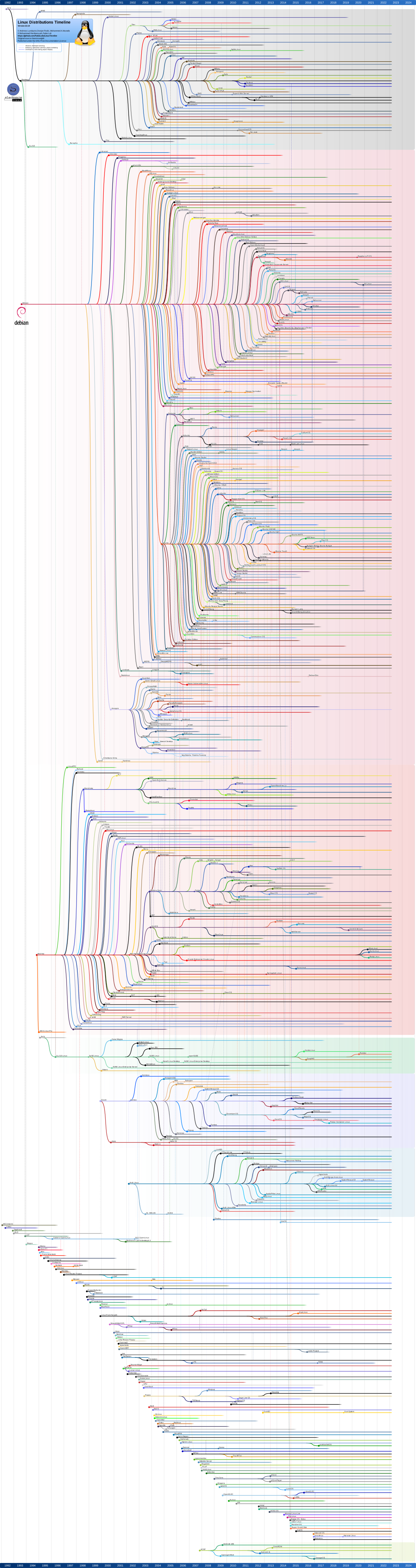
Linux Distribution Hell
https://upload.wikimedia.org/wikipedia/commons/1/1b/Linux_Distribution_Timeline.svg
Why Linux Dominates
- Free and open source — no per-unit royalty, no vendor lock-in
- Portable — runs on ARM, x86, MIPS, RISC-V, and more
- Mature — 30+ years of development, thousands of tested drivers
- Supported — huge community, vendor BSPs, commercial support (Red Hat, Canonical)
- Ecosystem — package managers, build systems, debugging tools
- Proven — powers critical infrastructure worldwide
The economic argument matters — but it is nuanced. Many RTOSes are also free (FreeRTOS, Zephyr, NuttX). Commercial ones (VxWorks, QNX) can cost $5–25 per unit. Linux's real advantage is the ecosystem: thousands of drivers, a full networking stack, filesystems, and package management — all included and community-maintained.
Where It All Comes From — UNIX (1969)

Ken Thompson & Dennis Ritchie at Bell Labs, ~1972
- Designed on a PDP-7 — less powerful than your calculator
- Originally written in assembly, rewritten in C in 1971
- First portable OS — the idea that one OS can run on different hardware
- Gave us: pipes, processes, "everything is a file", the shell
The UNIX Timeline
  1969  Bell Labs — Ken Thompson & Dennis Ritchie
        ┌──────────────────────────────────┐
        │  UNIX on PDP-7                   │
        │  "Write an OS for ourselves"     │
        │  Multics replacement             │
        └──────────────────────────────────┘
                      │
        1971  Rewritten in C → first portable OS
                      │
        1975  Spreads to universities
                      │
              ┌───────┴───────┐
        AT&T System V       UC Berkeley BSD
        (commercial)        (TCP/IP, virtual memory,
                             sockets — the Internet!)
Key insight: UNIX was rewritten in C in 1971 — making it the first portable operating system. Before this, every OS was tied to one machine.
The UNIX like family

The UNIX like family

The UNIX Fragmentation Problem
By the 1980s, every major vendor had their own UNIX:
| Vendor | UNIX Variant |
|---|---|
| AT&T | System V |
| UC Berkeley | BSD (4.2, 4.3, 4.4) |
| Sun | SunOS → Solaris |
| IBM | AIX |
| HP | HP-UX |
| DEC | Ultrix, Tru64 |
| SGI | IRIX |
Problem: code written for one UNIX didn't run on another.
Solution attempt: POSIX standard (IEEE 1003) — a common API specification. Helped, but fragmentation persisted. The market needed something different.
GNU + Linux = A Free UNIX (1983-1991)
1983 — Richard Stallman launches the GNU Project ("GNU's Not Unix"): - Goal: a complete free operating system - Built: GCC compiler, Emacs editor, Bash shell, coreutils (~385 tools) - Missing piece: the kernel
1991 — Linus Torvalds (21-year-old Finnish student) writes a kernel:
"I'm doing a (free) operating system (just a hobby, won't be big and professional like gnu)" — Linus, comp.os.minix, Aug 1991
GNU tools + Linux kernel = the first complete, free, UNIX-like OS.
This combination — not either project alone — is what powers embedded systems today.
The Post That Started It All

Linus Torvalds, comp.os.minix, 25 August 1991
- Posted to a Usenet newsgroup — no GitHub, no website
- "just a hobby, won't be big and professional"
- Within 3 years: 100+ contributors, networking, first distributions
- Today: ~1,700 developers per kernel release, powering the entire internet
Monolithic vs Microkernel — The Debate
1992 — Tanenbaum vs Torvalds (Usenet flame war):
| Tanenbaum (MINIX) | Torvalds (Linux) | |
|---|---|---|
| Architecture | Microkernel — clean, modular | Monolithic — everything in kernel |
| Argument | "Linux is obsolete" — microkernels are the future | Pragmatism: monolithic is simpler and faster |
| Outcome | Academically elegant | Took over the world |
The engineering lesson: a working, practical system beats an architecturally pure one. Linux won because it worked on real hardware, accepted contributions from anyone, and solved real problems.
Microkernel ideas survive in QNX (cars), seL4 (safety-critical), and Zephyr (MCUs).
Microkernel vs. Monolithic


From Hobby to Everywhere
  1991  Linux 0.01 — one student, one PC
    │
  1994  Linux 1.0 — networking, first distros
    │
  1999  Linux 2.2 — enterprise-ready, IBM invests $1B
    │
  2003  Android starts (Linux kernel + Java framework)
    │
  2008  First Android phone ships — Linux goes mobile
    │
  2017  100% of Top 500 supercomputers run Linux
    │
  2024  Linux 6.12 — PREEMPT_RT merged into mainline
    │
  Today  Linux runs on everything from $0.50 MCUs
         to Mars rovers (Ingenuity helicopter)
From a Finnish student's hobby to the operating system that runs the world — in 33 years.
MCU vs MPU vs SoC (Part 1)
| MCU | MPU | SoC | |
|---|---|---|---|
| What it is | Microcontroller: CPU + RAM + flash in one chip | Microprocessor: CPU only, external memory | System-on-Chip: CPU + GPU + peripherals in one chip |
| RAM | KB (264 KB on RP2040) | External, MB to GB | Integrated or external, MB to GB |
| MMU | No (or limited MPU) | Yes | Yes |
The MMU (Memory Management Unit) is the key hardware difference that determines whether Linux can run on a given processor.
MCU vs MPU vs SoC (Part 2)
| MCU | MPU | SoC | |
|---|---|---|---|
| Typical OS | Bare-metal, FreeRTOS, Zephyr | Linux, QNX, VxWorks | Linux, Android |
| Examples | RP2040, STM32F4, ATmega328 | i.MX6 (older), AM335x | BCM2711 (RPi 4), i.MX8M, Allwinner |
| Power | mW range (1-500 mW) | Hundreds of mW to Watts | 1-10 W typical |
| Cost | $0.50 - $5 | $5 - $30 | $5 - $50 |
In modern embedded design, SoCs have largely replaced standalone MPUs. The boundary between MPU and SoC is blurred — most application processors today are SoCs.
The MMU Dividing Line
Linux requires an MMU (Memory Management Unit) for:
- Virtual memory — each process sees its own address space
- Process isolation — one process cannot read/write another's memory
- Memory protection — kernel memory is shielded from user-space
This is why Linux runs on Cortex-A (with MMU) but NOT on Cortex-M (without MMU) like the Pico's RP2040.
  Cortex-M (no MMU)          Cortex-A (has MMU)
  ┌──────────────┐           ┌──────────────┐
  │  Bare-metal  │           │    Linux     │
  │  FreeRTOS    │           │   Android    │
  │  Zephyr      │           │   Yocto      │
  └──────────────┘           └──────────────┘
There are MMU-less Linux variants (uClinux), but they sacrifice isolation and are rarely used today.
Minimum Hardware for Embedded Linux
| Requirement | Minimum | Practical |
|---|---|---|
| Processor | 32/64-bit with MMU | ARM Cortex-A, RISC-V with S-mode |
| RAM | ~16 MB | 64 MB+ (256 MB+ for UI) |
| Storage | ~4 MB (NOR flash) | 16 MB+ (NAND, eMMC, SD) |
| Clock | ~100 MHz | 500 MHz+ |
| Serial console | UART for debug | UART + network |
A Buildroot + BusyBox system fits in 4 MB of flash and 16 MB of RAM.
A Debian-based distribution needs gigabytes of storage and hundreds of megabytes of RAM.
The choice depends on your product constraints, not on what is comfortable for development.
When Bare Metal Breaks Down
As feature count increases:
- Linux effort tends to grow roughly linearly (reuse kernel subsystems and existing tooling)
- Bare-metal effort grows much faster (you re-implement services yourself)
- The gap widens with each added capability: networking, OTA, logging, camera, UI, watchdog/recovery
WiFi, camera, OTA updates, logging, 24/7 watchdog — each feature on bare metal multiplies complexity.
Embedded Linux exists for exactly this inflection point. When one engineer can no longer maintain the firmware, you need an OS.
Embedded Linux = Linux Under Constraints
An embedded Linux system is a standard Linux system engineered to operate within strict constraints:
- Boot deadline — the product must be usable within a time budget (e.g., <5 s)
- Storage limit — the image must fit in available flash (e.g., 32 MB)
- Power budget — the system must run within a power envelope (e.g., 2 W)
- Lifecycle — the product must be maintainable for 10+ years
- Reliability — the system must survive unexpected power loss without corruption
- Security — the attack surface must be minimized (no unused packages)
The main engineering task is choosing what to keep, what to remove, and what to harden.
This is platform engineering — it requires understanding every layer of the stack.
The Engineering Mindset
Your prerequisite taught you to USE Linux. This course teaches you to BUILD embedded Linux systems.
The difference: every byte, every millisecond, every watt matters.
| Prerequisite | This Course |
|---|---|
apt install package |
Cross-compile for a 16 MB target |
systemctl start service |
Design the init sequence from scratch |
sudo modprobe driver |
Write the driver, write the device tree |
| Run on desktop or server | Run on 64 MB RAM, 32 MB flash, 2 W power |
You already know the commands. Now you learn why each layer exists and how to engineer them for constrained systems.
Linux vs MCU Firmware — Decision Model
Use Linux when: - You need rich device support (USB, Ethernet, WiFi, camera, display) - You need process isolation (multiple independent applications) - You need complex user-space (web server, database, Python, Node.js) - You need standard networking (TCP/IP, MQTT, HTTPS)
Use MCU firmware when: - Power budget is micro-watts (battery for years) - You need hard real-time guarantees (< 10 us latency) - The application is simple and well-defined (single control loop) - Cost target is < $2 per unit
Many products use both — an MCU for real-time control connected to a Linux SoC for networking and UI.
Concrete Comparison (Part 1)
| RPi Pico (MCU) | RPi 4 (Embedded Linux) | Desktop Linux | |
|---|---|---|---|
| CPU | Cortex-M0+ @ 133 MHz | Cortex-A72 @ 1.5 GHz | x86-64 @ 3-5 GHz |
| RAM | 264 KB (on-chip) | 1-8 GB (external DDR4) | 8-64 GB (DDR5) |
| Storage | 2 MB flash (on-chip) | 8-64 GB microSD/eMMC | 256 GB - 2 TB SSD |
| Boot time | <100 ms | 5-30 s (tunable to <2 s) | 15-60 s |
The boot time difference is significant: an MCU is ready almost instantly. Linux must initialize the kernel, mount filesystems, and start services.
Concrete Comparison (Part 2)
| RPi Pico (MCU) | RPi 4 (Embedded Linux) | Desktop Linux | |
|---|---|---|---|
| Power | 20-50 mW | 2-7 W | 50-300 W |
| OS | Bare-metal / MicroPython | Raspberry Pi OS (Debian) | Ubuntu, Fedora |
| Networking | None built-in (Pico W: WiFi) | Ethernet + WiFi + BT | Full networking stack |
| Process isolation | None (single address space) | Full (MMU + user/kernel) | Full (same as embedded) |
The same Linux kernel runs on both the Raspberry Pi 4 and a desktop. The difference is in the hardware resources available and the system configuration.
Real Product Examples
MCU (bare-metal / RTOS): - Thermostat controller — reads temperature, drives relay, simple display - Motor driver — PWM generation, current sensing, PID loop at 10 kHz - Wireless sensor node — sample, transmit, sleep for minutes
Embedded Linux: - Home gateway / router — NAT, DHCP, firewall, web config UI - IP camera — video encode, motion detection, RTSP streaming, cloud upload - Industrial HMI — touchscreen UI, Modbus, data logging, remote access
Desktop Linux: - Development workstation — IDE, compiler, debugger, simulation - Server — web services, databases, containerized workloads
"Use Both" — How?
When a product needs both Linux (networking, UI, storage) and hard real-time (motor control, safety), three hardware architectures are common:
| Architecture | How It Works | Example SoCs / Boards |
|---|---|---|
| Heterogeneous SoC | Cortex-A + Cortex-M on the same chip | STM32MP1, i.MX8M Plus, TI AM62x |
| External MCU | Separate MCU connected via UART / SPI / CAN | RPi + STM32, BeagleBone + Arduino |
| FPGA fabric | Programmable logic alongside a CPU | Xilinx Zynq, Intel Cyclone V SoC |
The choice depends on latency needs, BOM cost, and how tightly the two domains must communicate.
Heterogeneous SoC: STM32MP1
One chip, two worlds — no external wiring needed:
  ┌─────────────────────────────────────────────┐
  │  STM32MP157                                 │
  │                                             │
  │  Cortex-A7 (650 MHz)   Cortex-M4 (209 MHz)  │
  │  ┌───────────────┐     ┌──────────────┐     │
  │  │ Linux         │     │ FreeRTOS     │     │
  │  │ • Web UI      │ ◄─► │ • PID loop   │     │
  │  │ • OTA updates │RPMsg│ • 1 kHz ADC  │     │
  │  │ • Data logger │     │ • Motor PWM  │     │
  │  └───────────────┘     └──────────────┘     │
  │          shared memory (SRAM)               │
  └─────────────────────────────────────────────┘
M4 boots in < 50 ms (sensors running before Linux is up). Communication: RPMsg over shared SRAM.
External MCU: RPi + STM32
Two separate chips, connected by a bus:
   Raspberry Pi 4                        STM32F4
  ┌──────────────┐     UART/SPI     ┌──────────────┐
  │ Linux        │ ◄──────────────► │ FreeRTOS     │
  │ • Dashboard  │   commands +     │ • Sensor 1kHz│
  │ • Cloud MQTT │   telemetry      │ • Motor ctrl │
  │ • Camera     │                  │ • Safety     │
  └──────────────┘                  └──────────────┘
Pros: Use any MCU you want, easy to prototype (off-the-shelf boards). Cons: Two power supplies, two PCBs (or wires), bus latency (~1 ms for UART).
Best when: existing MCU firmware already works, or MCU needs certifications the SoC doesn't have.
When to Use Which Architecture
| Requirement | Heterogeneous SoC | External MCU | FPGA |
|---|---|---|---|
| Hard RT + Linux on one board | Best fit | Works (with wires) | Overkill |
| Existing MCU firmware to reuse | Port needed | Plug and play | Port needed |
| BOM cost sensitive (high volume) | Lowest (one chip) | Two chips | Expensive |
| Sub-µs determinism | M4 core: ~1 µs | MCU: ~1 µs | Fabric: < 100 ns |
| Certification boundary | Shared silicon | Clean separation | Clean separation |
Rule of thumb: Start with a heterogeneous SoC (STM32MP1, NXP i.MX8M). Fall back to an external MCU if you need a certified safety boundary or have existing firmware. Use FPGA only for sub-microsecond requirements.
The Layered Stack
Every embedded Linux system follows this layered architecture:
 ┌─────────────────────────────────┐
 │       Application Layer         │  ← Your product logic
 ├─────────────────────────────────┤
 │     Init System (systemd)       │  ← Service management
 ├─────────────────────────────────┤
 │        Linux Kernel             │  ← Drivers, scheduling, memory
 ├─────────────────────────────────┤
 │     Bootloader (U-Boot)         │  ← Hardware init, kernel loading
 ├─────────────────────────────────┤
 │  Hardware (SoC, RAM, Storage)   │  ← Physical platform
 └─────────────────────────────────┘
Each layer has one job and communicates only with its neighbors. You cannot skip layers.
The Stack in Practice

Each layer has a single responsibility:
- Bootloader — gets RAM working, loads the kernel
- Kernel — manages all hardware, schedules processes
- Init (systemd) — starts services in order, restarts crashes
- Application — your product code
A bug at any layer affects everything above it.
Layer Roles
- Bootloader (U-Boot / barebox) — initializes clocks, RAM, and storage; loads the kernel image into memory; passes hardware description (device tree) to the kernel
- Kernel — manages CPU scheduling, memory allocation, device drivers, filesystems, networking; enforces process isolation via MMU
- Init system (systemd / BusyBox init) — brings up user-space services in the correct order; supervises and restarts crashed services; manages dependencies
- Application layer — implements the actual product behavior; runs as regular Linux processes
Each layer trusts the layer below it and provides services to the layer above it.
If the bootloader is broken, nothing else works. If the kernel panics, all applications die. The stack is only as strong as its weakest layer.
Two Levels of Engineering (Part 1)
| Application Development | Platform / System Development | |
|---|---|---|
| What you build | Product features: UI, data processing, network protocols | The OS image: kernel config, drivers, root filesystem |
| Language | Python, C++, Go, Rust, JavaScript | C (kernel), Shell, Makefile, Kconfig |
| Interfaces you use | System calls, /dev/, sysfs, D-Bus, sockets |
Hardware registers, bus protocols (I2C, SPI), DMA |
These are two distinct skill sets. Most engineers specialize in one, but understanding both is essential for embedded Linux work.
Two Levels of Engineering (Part 2)
| Application Development | Platform / System Development | |
|---|---|---|
| When you crash | Your process dies; others continue | The kernel panics; everything stops |
| Typical job title | Embedded Software Engineer | BSP Engineer, Platform Engineer |
| This course examples | Python sensor reader, SDL2 display app | Device tree editing, kernel module, Buildroot image |
In this course, you will work at both levels: writing application code in Python and C, and configuring the platform with Buildroot and kernel modules.
The Boundary in Practice
  ┌────────────────────────────────────────────────────────┐
  │  Application    Python: read sensor, render UI,        │
  │                 send MQTT, log data                    │
  ├──────────────── system calls, /dev/, sysfs ────────────┤
  │  Platform       kernel driver, device tree,            │
  │                 systemd services, Buildroot config     │
  ├──────────────── hardware registers, bus protocols ─────┤
  │  Hardware       SoC, sensors, display, storage         │
  └────────────────────────────────────────────────────────┘
Example flow: A Python app calls open("/dev/i2c-1") and read(). The kernel's I2C driver translates this into hardware register accesses on the SoC's I2C controller, which communicates with the sensor over the I2C bus.
The application developer never touches registers. The platform engineer never parses sensor data.
Cross-Compilation: Why and How
On your laptop, you compile and run on the same machine. In embedded Linux, the target often has no compiler — or not enough RAM to run one.
  Host (x86_64)                    Target (ARM Cortex-A)
  ┌──────────────────┐             ┌──────────────────┐
  │  Source code     │             │  16 MB flash     │
  │  Cross-compiler  │ ──────────► │  64 MB RAM       │
  │  Libraries       │   binary    │  No compiler     │
  │  8 GB RAM, SSD   │             │  No package mgr  │
  └──────────────────┘             └──────────────────┘
Toolchain components: cross-compiler, cross-linker, target sysroot (headers + libraries for the target architecture).
You cannot apt install on a 16 MB system. You cross-compile everything on a powerful host.
Toolchain in Practice
The toolchain name encodes its purpose:
arm-linux-gnueabihf-gcc
 │    │     │       │
 │    │     │       └── compiler (gcc)
 │    │     └────────── EABI: hard-float (hardware FPU)
 │    └──────────────── OS: Linux
 └───────────────────── Architecture: ARM
| Build System | Toolchain Role |
|---|---|
| Buildroot | Downloads, configures, and builds the toolchain automatically |
| Yocto | Generates a complete SDK with sysroot and cross-tools |
| Manual | Download pre-built from ARM / Linaro, set PATH |
The sysroot contains target headers and libraries — it is the "fake root filesystem" the cross-compiler links against.
Power Management Fundamentals
Embedded Linux devices often run on batteries. The kernel provides three levers:
DVFS (Dynamic Voltage and Frequency Scaling) Lower clock speed → lower voltage → power drops cubically with frequency.
CPU Idle States (C-states)
| State | Power | Wake Latency | Description |
|---|---|---|---|
| C0 | Full | 0 | Active — executing instructions |
| C1 | ~60% | ~1 us | Halt — clock stopped, state preserved |
| C2 | ~30% | ~100 us | Sleep — caches may flush |
| C3 | ~5% | ~1 ms | Deep sleep — most logic powered down |
Trade-off: Idle deeper = save more power, but wake slower. A 1 ms wake latency means you cannot respond to events faster than 1 ms from deep sleep.
Why DVFS Is So Effective: The f³ Relationship
CMOS dynamic power dissipation:
- \(C\) = switched capacitance (fixed by chip design)
- \(V\) = supply voltage
- \(f\) = clock frequency
Naively \(P \propto f\) — halve the clock, halve the power. But that misses a crucial coupling.
Voltage and Frequency Are Coupled
In CMOS, faster switching needs higher voltage to overcome transistor thresholds:
\(k\) is a chip-specific constant (depends on manufacturing process — threshold voltage, gate oxide). Vendors publish the valid V-f pairs as an OPP table (Operating Performance Points).
Substituting \(V = k \cdot f\) into \(P = C \cdot V^2 \cdot f\):
Power scales with the cube of frequency.
The f³ Effect in Practice
Halving frequency → halve voltage → power drops to \((1/2)^3 = 1/8\)
| Frequency | Voltage | Relative Power |
|---|---|---|
| 1.5 GHz | 1.0 V | 100% |
| 1.0 GHz | 0.8 V | ~34% |
| 750 MHz | 0.7 V | ~18% |
| 600 MHz | 0.6 V | ~10% |
Running at 60% frequency saves ~90% power, not 40% — because voltage drops too.
Static (leakage) power does not follow f³. At very low voltages, leakage dominates and further reduction gives diminishing returns.
Power Budget Example
Scenario: Battery-powered sensor node. 3000 mAh battery at 3.3 V.
| State | Current | Duration per Cycle |
|---|---|---|
| Active (sample + transmit) | 150 mA | 5 ms |
| Deep sleep (C3) | 0.5 mA | 9,995 ms |
Average current = (150 × 5 + 0.5 × 9995) / 10000 = 0.575 mA
Battery life = 3000 / 0.575 = 5,217 hours ≈ 217 days
But: if wake latency from C3 is 1 ms, and your sampling window is only 2 ms, you lose 50% of your active time just waking up. Choose C2 instead: less power savings, but 100 us wake.
Power management is an engineering trade-off, not a checkbox.
Reliability Features
Three patterns you will learn in this course:
  WATCHDOG                OVERLAYFS               A/B UPDATES
  ┌───────────┐           ┌──────────┐            ┌──────────┐
  │ App hangs │           │ Power    │            │ Update   │
  │ > 30s     │           │ lost     │            │ fails    │
  └─────┬─────┘           └─────┬────┘            └─────┬────┘
        │                       │                       │
        ▼                       ▼                       ▼
  ┌───────────┐           ┌──────────┐            ┌──────────┐
  │ HW timer  │           │ Read-only│            │ Boot     │
  │ resets    │           │ root     │            │ previous │
  │ system    │           │ survives │            │ slot     │
  └───────────┘           └──────────┘            └──────────┘
- Watchdog: hardware timer resets the system if software stops responding
- Overlayfs: read-only base + writable overlay — power loss cannot corrupt the base image
- A/B updates: two root partitions — if the new one fails, boot the old one
Each solves a different failure mode. Together, they make embedded Linux field-deployable.
The Embedded Linux Ecosystem
Three dominant build systems — not distros, but build systems that create custom Linux images:
| System | Philosophy | Typical Use |
|---|---|---|
| Buildroot | Simple, fast, Makefile-based | Small images (4-100 MB), single-purpose devices |
| Yocto / OpenEmbedded | Flexible, layer-based, industrial | Large-scale products, multi-team, long lifecycle |
| OpenWRT | Router-focused, package feeds | Network equipment, gateways |
Contrast with the "download Raspberry Pi OS" approach:
| Raspberry Pi OS | Buildroot | |
|---|---|---|
| Image size | 2-4 GB | 8-50 MB |
| Packages | 30,000+ available | Only what you select |
| Boot time | 20-40 s | 2-8 s |
| Reproducibility | Depends on apt state | Deterministic from config |
We start with stock Raspberry Pi OS (fast, familiar). By Week 9, you build your own.
Block 1 Summary
Key takeaways from Block 1:
- Embedded Linux = Linux under constraints — boot time, storage, power, reliability, and security are all engineering targets
- The MMU is the hardware dividing line — no MMU means no Linux (use an RTOS or bare-metal instead)
- The stack is layered — bootloader, kernel, init system, application — each layer has one job
- Two engineering levels — application development (above the syscall boundary) and platform development (below it)
These four ideas form the foundation for everything else in this course.
Block 2
Group Exercise: "Pick Your OS"
The Key Trade-off
| Stock (Raspberry Pi OS) | Custom (Buildroot) | |
|---|---|---|
| Setup | Minutes | Hours to days |
| Image size | 1-4 GB | 4-100 MB |
| Control | Take what you get | Choose every package |
| Best for | Prototyping | Production |
Linux is "free as in puppy" — no license cost, but you must feed it.
In this course: start with stock, end with custom.
Four Building Blocks
Every embedded Linux image needs these four:
| Component | Example |
|---|---|
| Toolchain | arm-linux-gnueabihf-gcc |
| Bootloader | U-Boot |
| Kernel | Linux, configured for your hardware |
| Root filesystem | Libraries, binaries, config — everything in / |
Missing any one = board does not start.
Choose Your OS
Your team receives a product specification (next 4 slides).
Your task:
- Read the requirements and constraints carefully
- Decide: Linux, RTOS, bare-metal, or a combination?
- Sketch which components run on which processor
- Identify the biggest technical risk
Defend your choice!
There is no single correct answer — but there are answers that ignore constraints. The goal is to practice the decision process.
Product A — Smart Thermostat
Requirements: - Temperature reading every 10 seconds - WiFi upload to cloud service (MQTT) - Local OLED display showing current and target temperature - Fan/heater relay control (on/off + PWM speed) - Remote firmware updates (OTA)
Constraints: - BOM cost < $8 (high volume, 100k+ units) - 5-year battery life (or mains-powered with battery backup) - Must survive unexpected power loss without data corruption - Consumer product — must be reliable and low-maintenance
Hint: Consider whether a WiFi-capable MCU (ESP32) can handle this alone, or whether you need Linux for OTA and cloud connectivity.
Product B — Agricultural Drone
Requirements: - Flight controller running PID loops at 400 Hz - Camera with computer vision (crop health analysis) - GPS waypoint navigation with autonomous flight - Telemetry downlink to ground station (900 MHz radio) - Mission logging with post-flight data export
Constraints: - Control loop latency < 2.5 ms (hard real-time) - 30-minute flight time (power budget is critical) - Must handle GPS signal loss gracefully (failsafe hover/return) - Outdoor operation: -10 C to +50 C, vibration, wind
Hint: No single processor can do both 400 Hz PID control and OpenCV. Think about what runs where.
Product C — Industrial PLC Replacement
Requirements: - 8 analog inputs sampled at 1 kHz (4-20 mA sensors) - Modbus TCP server for SCADA integration - Local HMI with 7" touchscreen - Historian: log all I/O data for 30 days - IEC 61131-3 runtime (ladder logic / structured text)
Constraints: - 24/7 operation, 10+ year product lifecycle - Scan cycle time < 100 ms (deterministic) - Safety certification (IEC 62443 for cybersecurity) - Must operate without internet connectivity
Hint: Industrial systems value determinism and long-term support over features. Consider which OS gives you certifiable determinism.
Product D — Portable Medical Monitor
Requirements: - ECG sampling at 500 Hz (3-lead) - SpO2 (pulse oximetry) and blood pressure measurement - 7" color touchscreen with real-time waveform display - BLE connectivity to hospital information system - 8-hour battery life on a single charge
Constraints: - IEC 62304 Class B software lifecycle (medical device) - Alarm response time < 1 second (patient safety) - Field-updatable firmware (with rollback on failure) - Must pass EMC testing (medical environment)
Hint: Medical devices often use a safety-critical MCU for signal acquisition and alarming, with a Linux SoC for display and connectivity. Consider the certification boundary.
Discussion Framework
For each product, systematically answer:
| Question | Why It Matters |
|---|---|
| Which tasks are time-critical? | Determines if you need an RTOS or hard real-time |
| Which tasks need rich OS features? | Networking, filesystem, display → Linux territory |
| What is the boot time budget? | Seconds vs minutes changes your architecture |
| What is the certification requirement? | Certified RTOS vs Linux PREEMPT_RT vs uncertified |
| Can you split across MCU + Linux? | Dual-processor designs are common and often optimal |
The best embedded systems are often heterogeneous: an MCU handles real-time tasks while a Linux SoC handles everything else, connected via UART, SPI, or shared memory.
Key Takeaways
- Embedded Linux = Linux under constraints — boot, storage, power, reliability, security
- The MMU is the dividing line — no MMU → no Linux
- The stack is layered — bootloader → kernel → init → app
- Tool choice follows system needs — Linux, RTOS, or bare-metal based on requirements
- Many real products use both — MCU for real-time + Linux for everything else
Project Ideas for This Course
The level display is the default — but you can propose your own:
| Project | What you build | Key skills |
|---|---|---|
| Weather station | Sensors → MQTT → web dashboard | Networking, systemd, Flask |
| Data logger appliance | Resilient CSV logger with REST API | overlayfs, Buildroot, watchdog |
| Audio spectrum analyzer | USB mic → FFT → SDL2 bars | Real-time, DMA, graphics |
| CAN bus dashboard | MCP2515 → gauges on HDMI | socket-CAN, drivers, SDL2 |
| Robot remote control | Browser → WebSocket → motors | Camera stream, PWM, web UI |
| Digital oscilloscope | ADC → trigger → waveform display | RT kernel, SDL2, DRM/KMS |
Full list with details: Project Ideas
What's Next
Today's lab: SSH into your Raspberry Pi and complete baseline Linux exploration checks.
Next week: Lesson 2 — How Linux Works (processes, files, permissions, kernel vs user space)
See you in the lab!